
This is what fills my heart with warm fuzzies. When those that are part of the Reason and Record community come together to Analyze and tackle some of the more difficult aspects of the software and fill in the gaps that may be left by incomplete specifications. Ed did it previously with his Thor Sine Wave Shaper tutorial, using it to cross-fade between 4 different devices. And now Allen Day (“rogerraa”), Wendy of Wendy Dunham Music fame and Giles Reaves (Selig) from the Selig B3-Leslie refill fame have teamed up to provide the penultimate BV512 Spectrum Analyzer. Selig provided the charts, and Wendy provided the Combinator with a backdrop that cleverly shows the frequency bands.
Download the charts along with the Combinators here: spectrum-analyzer-project-files. This zip file contains the two charts outlined below, and Wendy’s 2 Combinators: 1. A 16-band Spectrum Analyzer and 2. A 32-band Spectrum Analyzer. They both use the BV512 Vocoder/Equilizer in Reason. You can, however, use this in Reason or Reason+Record.
So how do you use this? Well, let’s let Wendy explain:
Note: This excerpt is taken from her site. There is also a video you can watch about how it works here: http://www.galxygirl.com/videos/music-making/spectrum-combinators.html. She has graciously allowed me to present it here on my blog (thanks Wendy, you are indeed amazing for sharing this with us 🙂 )
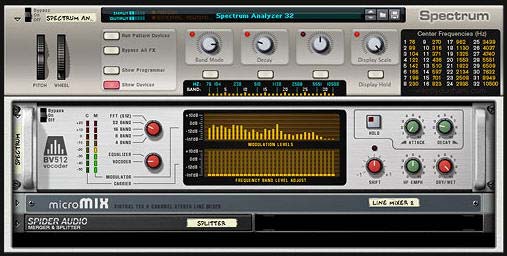
These are convenient Spectrum Analyzer Combinators to see your song’s frequency spectra. Each one has an accurate Scale with Band and Hz labels. I prefer the Spectrum Analyzer 32 band version, but in case you don’t want that much resolution, I also created a Spectrum Analyzer 16 band version.
- Band Select: 4, 8, 16, 32, FFT (512)
- Decay: Lower = faster display; higher = overall averaging.
- Display Scale: Roll this back to see the peaks.
- Display Hold: Take a snapshot in time.
Place before final output. It’s a great aid for balancing your mix!
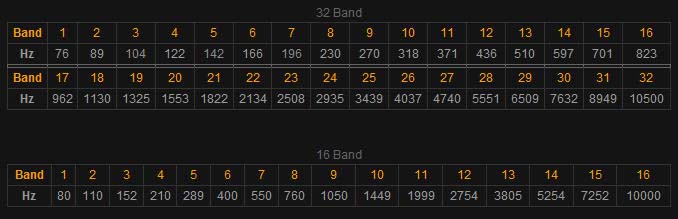
These reference charts for all band frequencies are printed on each combinator. The frequencies were measured accurately by Giles Reaves (“selig”) and Allen Day (“rogerraa”) on the Propellerhead User Forum.
Here’s another tip:
For those interested, Selig did a great job putting together the frequency charts for the 16- and 512 (FFT) -band modes of the Vocoder. Here are the screenshots:
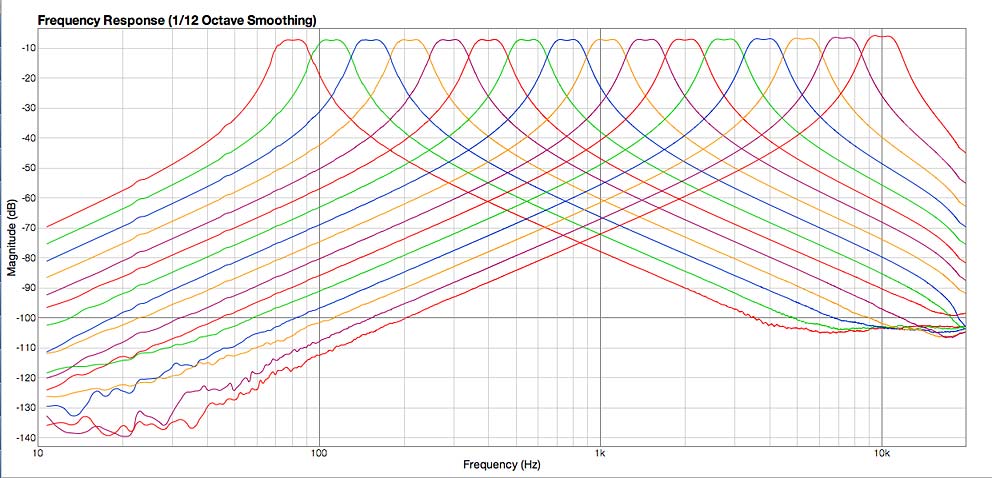
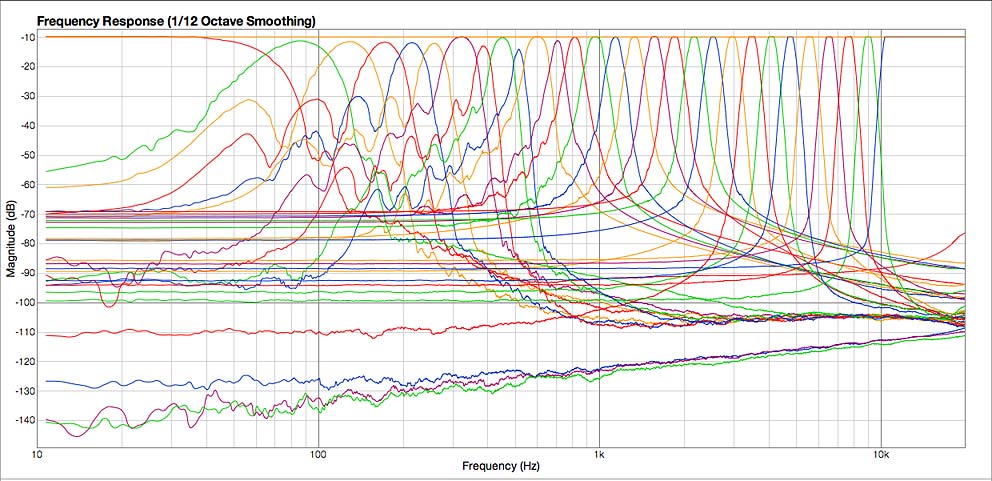
There you have it. Thanks so much to Wendy, Giles, and Allen for these great resources. Your important work does not go unnoticed.
merci pour toutes ces informoations
thank you for these informations
laplie
Laplie,
de rien.
pas de probleme.
je suis tres content que vous aimez les lectures.
😉
Thanks so much for this stuff, umm…
merci beucoup (pardon mon francais)
Very informative. Respect to those whom have analyzed it 😀
just added this to my default song, awesome possum
Huge amount of respect to those who have worked this out. Wendy and Giles are two awesome Reason/Record gurus. We could all learn a lot from them. So what should I jump into next for another article or how-to?
Cheers to all.
Rob
Please Correct me if I’m wrong, but this connection only see the spectrum in mono, not better to have two BV512 (left and right) to view in stereo
Ruben,
There’s nothing to prevent you from using the BV512 as a spectrum analyzer for both left and right analysis. Personally, I think this is overkill and if you are going to do that, you may as well invest in a top quality analyzer. For quick monitoring of your frequencies, I personally like using a single BV512 to monitor the entire signal. It’s still monitoring the stereo signal, not the mono signal. But what you see is a sum of both the left and right channels. So this might be confusing. Splitting them to left and right would allow you to see them separately as you suggest. And as I said, there’s nothing wrong with setting things up this way.
Cheers!
Now I did some tests and if he was wrong, the spectrum analyzer if it is stereo, but even so, as to them with two can see the spectrum BV512 Left and Right separately, and so have better control. I appreciate the opinions…
Wendy was having some problems posting to my forum here. Not sure why exactly. But I’ll have to check it out. In the meantime, this comment is directed at Ruben Erre:
“My design actually merges left and right channels using an audio
spider, so one display can be used. I felt that was easier for the
user than using two displays for left and right.”
Direct from Wendy. Visit her website or get in touch with her here:
http://www.wendydunham.com/
much respect to those who have taken the time for this!
This is awesome! Thank you so much for your innovations!!
No problem. But this spectrum analyzer was not put together by me. It was the hard work of 3 other people who were mentioned in the post. They deserve all the credit for this extraordinary patch. It’s great to have people such as them willing to share their work with the rest of us. We all are the better for it. So Thanks to them for the innovations!
how do i hook this up to one of my synths? i have a synth in a combi. i routed the output of my synth combi into the input of the analyzer combi. then the output of the analyzer combi into my main mixer. no sound or analysis. what am i doing wrong??
sorry for the very beginner questions. but if i were a pro i probably would not need to use a spectrum analyzer, id be using my ears :P. also thank you for this nice little device.
oh and one last thing. is there anyway to set it up to see the lower frequencies like down to 20-30hz? i make a lot of bass heavy music so it would be helpful to see all the way down there.
Steve,
You have set up the device properly. You probably haven’t clicked the “Show Devices” button on the Combinator. When you do that, you will see the “BV512 Vocoder” device inside. Now when you play the synth, you’ll see the frequency bands responding, which is an analysis of your audio. That’s all there is to it.
For your other question, you can’t use the BV512 to show frequencies that low. You can only show approximately 60 Hz and above. That’s just the way the Vocoder device is built in Reason. If you need to see frequencies lower than this, you’ll have to use a 3rd party frequency analysis tool outside Reason and Record.
Does that help?
Thanks for this, a big up and great help! I do need some clearing up on something… this seems limited to frequencies down to only 76Hz, correct? Is there any way to accurately see whats going on below this? Say down to 30hz-40Hz range for sub bass work? Thank you.
@Anthony,
I’m afraid you can’t visualize these frequencies in Reason. You’ll have to go to a dedicated Spectrum Analyzer outside Reason. This is why many people have expressed the desire to have the Props develop a dedicated Spectrum Analyzer in Reason. So far, this is the best design idea I’ve come across. We can’t be greedy now can we? 😉
cool
Hello.. I noticed these comments and wanted to see if I might be able to help..
Im pretty sure Im thinking of a way to analyze the lower frequencies–
this could either be genius idea or not work at all.. Its kind of a hack / cheating way to do it- I havent really thought it all the way through, just an idea, but yeah-
ok- to build it- take a signal – split it into however many bands you want to end up with (one for every specific frequency you want to monitor) and route each one into its own 14:2 mixer channel..
create yourself a signal generator – use a thor, turn everything off except one analog OSC, set to sine wave, lowest octave. Turn the main envelope attack and release all the way down and decay and sustain all the way up. Now using a 5 octave (or more) midi keyboard you should be able to play a sinewave through the range of frequencies from low (inaudible) to high by pressing each note lowest to highest-
this will be for construction reference..
now take each band / channel and route to its own thor Audio inputs 1 and 2 and use the thor as a filter. (filter 3) — you can check a tutorial for how to route audio through thors filters..
Use a low pass filter with no resonance (for filter 3). make sure filter envelopes are turned off.
now it seems that, by playing a high frequency note, and adjusting the low pass filter to chop off a piece of the high end of the frequencies, then heres the cheating part- use an Oscilloscope of some kind- and see what frequency youre cutting off at. now label that channel for that freq. and move onto the next- cut off a small amount more, to whatever freq youre using next, then mark it again. repeat this process.
so now you will have a single stereo input, leading to the 14:2 mixer, and each channel chops off a certain range of frequencies.
soo- to use it then- Split your main signal of whatever bass sounds or what you want to analyze into 2 paths- and route one path into the mixer, but nothing coming out. (your other one goes to your normal mixer and the signal is untouched.
so now if you play a high note on the keyboard, you should be able to see visually which levels are engaging based on which frequencies are bleeding through to each channel.
there should be some way to set this up so that you can use it like a Frequency Finder / Spectrum Analyzer for the lower end.. That was my idea..
so its more like a low to high frequency level monitor that sees whatever freqs you tell it to, and whatever range, only sitting on its side, if you know what i mean.. (flip the 14:2 mixer sideways)
and wherever the channels light up to and stop at, thats the frequency thats coming through.
I welcome any emails if anyone wants to ask anything but there ya go..
I just thought of something- use another filter to chop off low end also, and isolate the frequency, do that for each band, then each one should light up for each frequency
@LiquidChem, have you tried to build it? Sounds like an interesting idea. From what I gather, you’d be able to see the frequencies by looking at the 14:2 Mixer. Hmmm. Definitely an interesting idea.
GREAAAAT THANKS
Where can I download the BV512 Spectrum Analyzer?
Thanks
@Don,
It’s on the same page you left your comments. In the post it’s in the second paragraph (the blockquote). You’ll see a link there.
Rob
thanks thats great
CANT DOWNLOAD
@djgodes,
I’m using Firefox 9.0.1 and I just tested this. I’m able to download that file. Perhaps try using that browser?
I can’t download the file. The link is not leading me to the download. I tried doin this thru Firefox but failed. Hope someone can help.
Thanx.
Not to worry, I got it.
Thanx.
Can’t download this. Im using the latest version of Safari. Could someone email this to me?
@EMC,
If you’re having problems downloading this, try here: http://www.galxygirl.com/studio/reason/reason-patches.html – same files. 😉
@LiquidChem and others, I guess you missed seeing my other two Spectrum Analyzers that I created to display lower and higher frequencies not covered by my standard Spectrum Analyzer (76 Hz-10500 Hz). They are Spectrum 2 (11 kHz–20 kHz) and Spectrum Ø (39 Hz–73 Hz).
Awesome work guys! Thanks 🙂
Thank you playa!
This is incredibly awesome. Thank you!
Django,
You’re welcome. I didn’t do any of the heavy lifting though. Those that put it together deserve all the credit. 😉
Congratulations for this great effort. I just want to know how do i connect everything up in order to get it running?
Thanx,
ap
You simply place the Combinator as an insert between whatever you’re trying to analyze and the Mixer / Mix Channel. Audio > Combinator > Output. Hope that helps.
@Anthony + @PhiSequence
Nowadays in Reason 7 the Spectrum EQ can show frequencies as low as 20hz.
Unfortunately the Spectrum EQ in Reason 7 only works between frequencies 40hz – 22khz.
That SUCKS of course, first of all humans can only hear between 20hz – 20khz thus 22khz makes no sense.
Secondly it sucks because there are many music styles (think of techhouse, dubstep, hiphop, etc.) that requires a super deep subbass, which are between 20hz-50hz.
I contact Propellerhead about this and they said they limited the Spectrum EQ to the specs of the SSL mixer.
Basically everything what you change in the Spectrum EQ is actually visible in the SSL mixer, so in fact with the Spectrum EQ you control the SSL mixer.
Please Propellerhead, if you guys read this…. FIX IT!
Think “out-of-the-box” and don’t limit it to that obsolete 1950 SSL mixer.
Rather let us be able to EQ the REAL audible frequencies for humans (20hz-20000hz).
22000hz makes no sense.
At least remove the 40hz limitation (thus let us go deep till 20hz).
Rob,
There are other Rack Extensions that will give you lower bass end. You might want to try picking one of those up. I know the new spectrum EQ is a visual way to see the SSL Mixer, and this is all well and good. But for me, I would rather see a true analyzer like the one in Adobe Audition. This way I could deeply analyze and reverse engineer frequencies. Or Izotope’s spectrum analyzer. There’s many other ways to view things. In Reason, unless you use a Rack Extension, you’re not going to get the full range. That’s just the way it is. And it can’t be helped.
Cheers!
@Reason101
I was thinking about http://shop.propellerheads.se/product/req131-31-band-eq/ to boost subbass freq’s and use it with the Spectrum EQ to see it.
Problem is it is far from perfect as the Req131 has dedicated frequenties (such as 20hz, 25hz, 31,5hz, 40hz, etc.etc.) and not “variable” frequenties like the Spectrum EQ has.
What i mean is with Req131 you can only boost dedicated frequencies that are shown on its panel, like 31,5hz, but you can’t for example boost 37hz or 38,6hz.
Anything between those frequencies shown on its panel is not possible.
I really do like Reason’s new Spectrum EQ as it’s pretty easy to use and looks very cool but removing the 40hz limit would literally make my day (and i’m sure lots of other Reason clients too!).
I don’t think it’s too much work for Propellerhead since it already show the frequencies as low as 20hz.
I honestly don’t know how much effort it would be for the Props to add those frequencies. I have to think that it would be a bit of an effort, since they haven’t done it yet. Otherwise, why would they not just do it right?
@reason101
The reason why they (Propellerhead) did not do it (for so far) is that the Spectrum EQ in Reason 7 is (intentionally) limited to the working specifications of the SSL 9000k (emulation) Mixer in Reason.
Well, that’s what they have told me.
When using the Spectrum EQ you literally see and control the EQ settings in the SSL 9000k.
That’s it.
So in fact it’s just easier and faster EQ-ing as it has a visual reference from the spectrum analyzer.
But Propellerhead must realize that nowadays when genres as tech-house, dubstep and even older genres like hip-hop it’s not only about what you “hear” but also what you “feel” (vibrations of sound from speakers like in a club or festival).
Deep subbasses can literally shake speakers, and those low frequencies are just essential in the few genres i mentioned.
I know they matched the Spectrum EQ with the SSL. It’s just a visual representation of what you have always had available in the SSL. I know this. What you’re asking for is more of a revamp to the range of the SSL. However, I’m saying that’s probably not an easy task. What would make more sense is to revamp the MClass EQ to hit those ranges. Just my thoughts. I think that would be easier, since it targets a single device and not the whole Mixer. But even that may be difficult for some unknown programming reason. I’m really not sure. But of course I would like the range extended as well. Which is why I’m recommending looking at other potential Rack Extensions.
thanks so very Much
No problem Bill!
Man this is so intelligent,thanks !!!
Thank the guys that put it together. Smarter than smart. 😉